 🏨
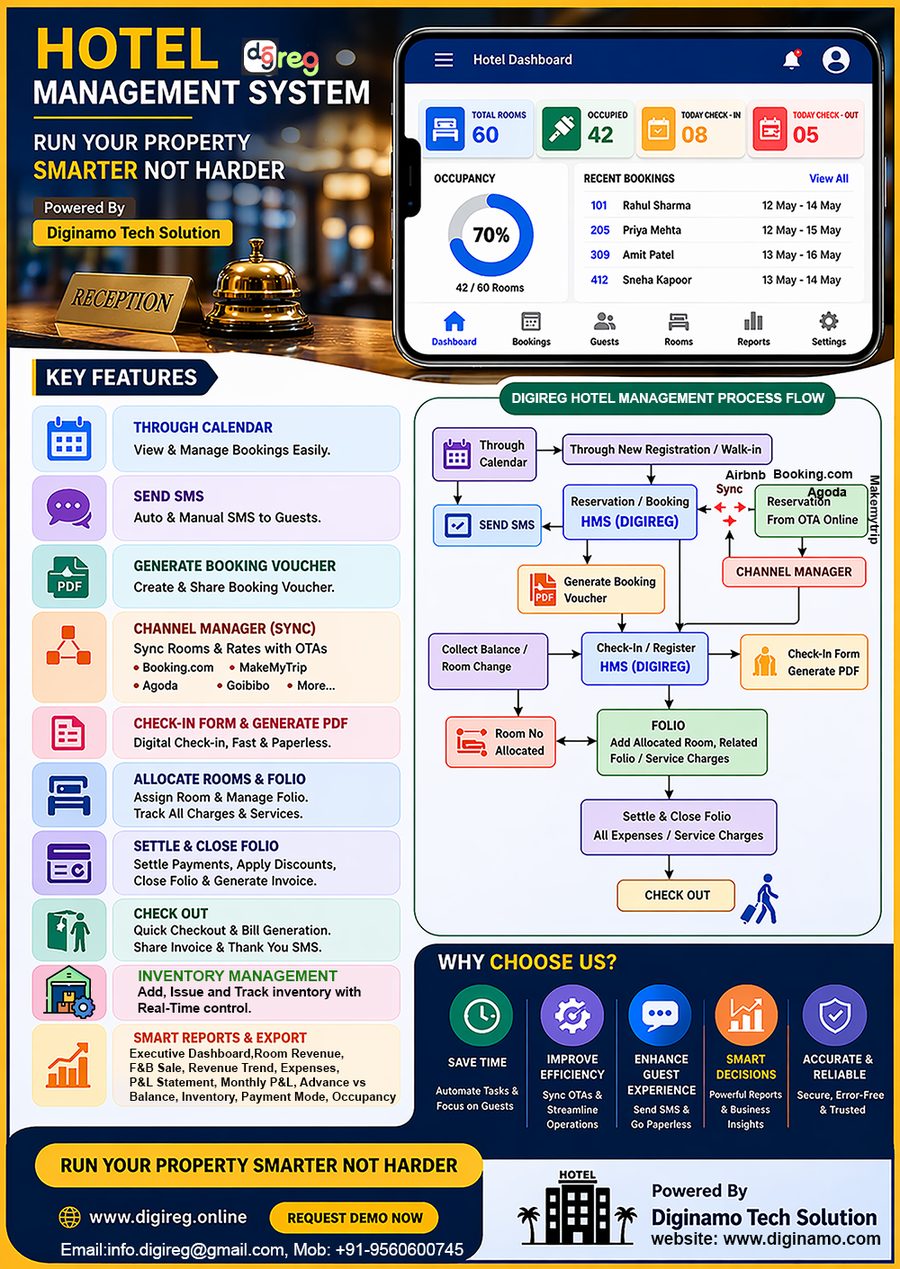
🏨Reservations — See reservation history in card view and list view, booking through Calendar, booking through reservation button, view and manage all upcoming, cancelled, no show monthwise bookings History
Estimate/Quotation — Create and share professional estimates or quotations with guests/customers on request. Easily add rooms, services, rates, taxes, discounts, and other charges, then generate a clear quotation for customer approval before confirming the booking.
Cancellation — Thhis process have track cancelled bookings, Process Cancellation,Cancellation Log,Refund Transactions,Audit Log,Cancellation Policy,Cancel Booking,Cancellation Settlement,OTA Sync Log
OTA Voucher — Generate booking vouchers resevation received from OTA channels
Walk-in Voucher — Generate booking vouchers for guest for direct booking
Check In — Perform check-in process for arriving guests and assign rooms with digital signature
Guest Log — Export full history in excel and pdf format of all guest stays and records
Check-in Register — Download individual guest check-in form Excel/PDF official guest Check in History
Room Status — Live view of occupied, available, and reserved rooms
Reservations — Financial view of all booking deposits and dues.See reservation history in card view and list view, booking through Calendar, booking through reservation button, view and manage all upcoming, cancelled, no show monthwise bookings History
Folios — Generate itemized guest folios for active stays, post all service charges and payments against the booking reference, ensure the customer payment is correctly allocated, settle the folio balance, and complete the check-out process.
Expenses — record and track all operational expenses like Salary, 🔧 Maintenance
⚡ Utility
🛒 Purchase
🍱 Food Purchase
🧹 Housekeeping
📣 Marketing
🚗 Transport
🔨 Repair
📦 Other
Inventory — stock levels, usage tracking, and low-stock alerts
Tax Reports — CGST, SGST, IGST summaries ready for GST filing
Generate Invoice — Generate invoice for individual / corporate customer applying with service charges, necessary taxes and GST for same state /other estates. Generate invoice without f&b billing and with f&b billing. Create and download guest invoices as PDF.
Add New Room — Create a room with type, rate, floor, and category
All Rooms — View, edit, or deactivate all existing rooms
Menu — browse all available food and beverage items
Current Bill — Generate separate Food & Beverage (F&B) invoices for individual guests, corporate guests, and corporate customers. For corporate billing, include the company name, billing address, and GSTIN. Automatically apply the applicable GST (CGST & SGST for same-state transactions or IGST for inter-state transactions) and service charges as per current regulations. Provide the option to view, generate, download, and print active/open bills for checked-in rooms.
Recent Invoices — View and Download list of recently settled F&B bills
Generate Invoice & Download PDF — Finalise and export the F&B bill as PDF
Categories — Manage meal categories like Breakfast, Main Course, Snacks, Desserts, Soft Beverages, Juices & Shakes, Hard Beverages
Discounts — set item-level or category-level discount rules
Menu Items — Add, edit, or remove individual food and drink items
Init / Rebuild — Initialise or rebuild all OTA channel connections from scratch
Full Sync All — Push full inventory sync to all connected OTA channels immediately
📅 Add iCal Channel — Connect a new OTA platform via iCal URL feed
Add Direct Channel (Instant Update) — Add a real-time push API channel
📡 Channels — View and manage all connected OTA channel connections
📋 Bookings — List of all bookings received from OTA channels
🏠 Inventory — Current room availability pushed to each channel
🔗 Room Mapping — Map HMS room numbers to OTA platform room type IDs
📜 Sync Log — Timestamped log of all sync events and any errors
OTA Price Sync Manager — overview and control panel for all rate syncing
Setup Credentials — add or update API keys for each connected OTA platform
Bulk Update — update rates for multiple rooms and date ranges at once
Push All Rates — push current rate plan to all connected OTAs immediately
🏠 Rooms & Prices — view per-room rates currently published on each OTA
📋 Push Logs — history of all rate push events with success or error status
⏳ Retry Queue — failed pushes queued and scheduled for automatic retry
Dashboard — The Executive Dashboard provides a real-time overview of key business metrics, including total revenue, room revenue, F&B revenue, expenses, gross profit, occupancy, ADR, RevPAR, and total bookings. Interactive charts display revenue distribution and revenue vs. expense trends, enabling management to monitor financial performance, occupancy levels, and operational efficiency. Reports can be filtered by date and exported to Excel, PDF, or printed for quick analysis and decision-making.
Room Revenue — Generate and export comprehensive Room Revenue Reports with Daily, Weekly, Monthly, Quarterly, Half-Yearly, and Yearly views. The module include graphical dashboards displaying Room Type-wise Revenue, Occupancy Trends, and Booking Source-wise Revenue Analysis (Walk-in, Direct Phone Booking, Website Booking, OTA/Channel Partners such as Booking.com, MakeMyTrip, Goibibo, Airbnb, etc.). Reports support PDF and Excel export, enabling management to analyze revenue performance, booking trends, and business growth effectively.
F&B Sales — **Export/Download comprehensive Food & Beverage (F&B) Sales Reports** with **Daily, Weekly, Monthly, Quarterly, Half-Yearly, and Yearly** summaries. The reporting utility provides **graphical dashboards** for **Top-Selling Food Items**, **Category-wise Sales Summary**, **Food & Beverage Revenue Analysis**, and **Category Breakdown**. Reports can be exported in **PDF and Excel** formats, enabling management to monitor sales performance, analyze product-wise revenue, identify best-selling categories, and make informed business decisions.
Revenue Trend — Export/Download day-wise or month-wise revenue trend chart
Expenses — Export/Download Operational Expense Reports by category, including Food Items, Utilities, Salaries, Housekeeping, Maintenance, Repairs, Transportation, and other expenses. The system also provide department-wise expense reports with filtering and export options for better financial analysis and management.
P&L Statement — Export/Download full profit and loss summary for a selected period. The Profit & Loss Statement provides a complete overview of business performance by displaying revenue streams, operational expenses, gross profit, net profit, and profit margins. It supports category-wise expense tracking, including salary, food purchases, utilities, housekeeping, maintenance, repairs, transport, and inventory costs, with options to filter, export, and print reports for effective financial management and decision-making.
Monthly P&L — Download month-by-month profit and loss comparison view. The Monthly P&L dashboard provides a comprehensive view of revenue, expenses, gross profit, net profit, and profit margins with monthly trends and graphical analysis. Users can filter reports by date range, group data by period, and export detailed reports in Excel, PDF, or print format for better financial monitoring and decision-making.
Occupancy — Occupancy rate by room, floor, and date range. The Occupancy Report provides real-time insights into hotel performance, including total check-ins, room nights sold, occupancy percentage, and available room nights. It offers room-type-wise occupancy analysis along with detailed guest stay records, helping management monitor booking trends, room utilization, and overall operational efficiency. Reports can be filtered by date and exported to Excel, PDF, or printed for easy review and analysis.
Advance vs Balance — advance collected vs balance pending report. The Advance vs Balance Collection Report provides a complete overview of guest payment collections, including total advances received, balance payments collected, and overall revenue. It offers payment mode analysis through visual charts and detailed transaction records for both advance and balance collections. The report supports date-wise filtering, along with Excel, PDF, and print options for efficient financial tracking and reconciliation.
Inventory — stock usage and current levels report. The Inventory Consumption Report helps track item usage, consumption costs, current stock value, and transaction history across different departments. It provides category-wise and department-wise analysis with detailed records of quantities consumed, unit costs, total costs, and remarks. The report supports date filtering and export options in Excel, PDF, and print formats for efficient inventory control and cost management.
Payment Modes — revenue split by cash, UPI, card, bank transfer. The Payment Mode Analysis Report provides a detailed breakdown of collections by payment methods such as cash, UPI, card, bank transfer, and advances. It offers separate insights for room folio and F&B transactions through visual charts and transaction summaries, enabling better cash flow monitoring and financial reconciliation. Reports can be filtered by date and exported to Excel, PDF, or printed for convenient analysis and record-keeping.
Export Reports — choose report type and preferred export format
Download Excel — export any report as .xlsx spreadsheet file
Download PDF — export any report as a formatted PDF document
Print — send the current report directly to your printer
Select Recipients (Beta Version) — choose guests by stay status or date range
Live Preview — preview the SMS message as guests will receive it
Compose Message — write a new SMS using dynamic guest name and room variables
Send Campaign — trigger and send the composed campaign to selected guests
SMS Provider Configuration — connect and configure the Fast2SMS API key and DLT ID
Campaign History — list of all past campaigns with delivery status and counts
Save as Template — save current message as a reusable campaign template
Hotel Information — name, address, logo, contact details, and GST number
SMS Settings (Fast2SMS) — API key, sender ID, and DLT template configuration
Tax Registration & Certificate Documents — manage all compliance documents
Tax & Certificate Numbers — store GSTIN, PAN, trade licence numbers securely
Upload Documents — upload scanned property certificates and licence copies
Quick Policy Rules — set check-in/check-out time, guest ID rules, and defaults
Cancellation Policy — define refund rules, penalties, and cancellation windows
Change Password — update the login password for any hotel user account